Your series, scheduled
Pick the posting days, times and timezone. New episodes arrive on schedule.
- Topic
- Script
- Voice
- Video
- Posted
The AI creative studio for creators and brands
One AI studio for faceless videos, UGC ads, images, voice and music. Edit every scene, then put your channel on Autopilot.
Free to start. No credit card required.
200,000+ users trust FluxNote
Independent customer reviews
“Everything in one place makes the process smoother.”
“The initial setup is almost friction-free and requires zero technical background.”
“FluxNote turns a simple idea into a polished video with minimal effort.”
Video, images, ads, voice and music live in one workspace. Start from an idea, edit every scene and publish, without moving files between tools.
Start from words, an image or an existing clip. Shape the motion, extend the shot and finish with captions, all in the same workspace.
Frame controls, extension and editing work with supported models.
Open AI Video StudioPick a format for your story, explainer or narrated scenes. Visuals, voice and captions carry the video, with no recording of you.
Make a faceless video


Pick an avatar presenter, add your product and a script, and FluxNote builds a creator-style ad with lip-synced voiceover and music. Start from a product link, a script or an image, then test different hooks and scenes.
UGC, AD and Lip Sync Studios are included from the Rise plan. Use only faces and voices you have permission to use.
Explore ad creationCreate thumbnails, product scenes and illustrated concepts. Compare model families side by side, then animate the frame you like.
Try Image Studio


Turn a script into narration, generate a soundtrack, or sync a voice to a face in Lip Sync Studio. Choose the voice, language and music direction.
Use only voices and faces you have permission to use.
Explore audio tools
Set up a series once. Autopilot writes, voices, captions and renders each episode, then posts it to your accounts on the schedule you chose.
You stay responsible for what you publish: check each series before you rely on it.
Set up a video series
Presenter avatars for ads, and Lip Sync Studio to match a new voiceover to an existing speaking video.
Rise and aboveProduct ads: pick a format, a scene and an avatar, then test variations.
Rise and aboveTurn a long video into short, captioned clips. Free trial exports carry a watermark.
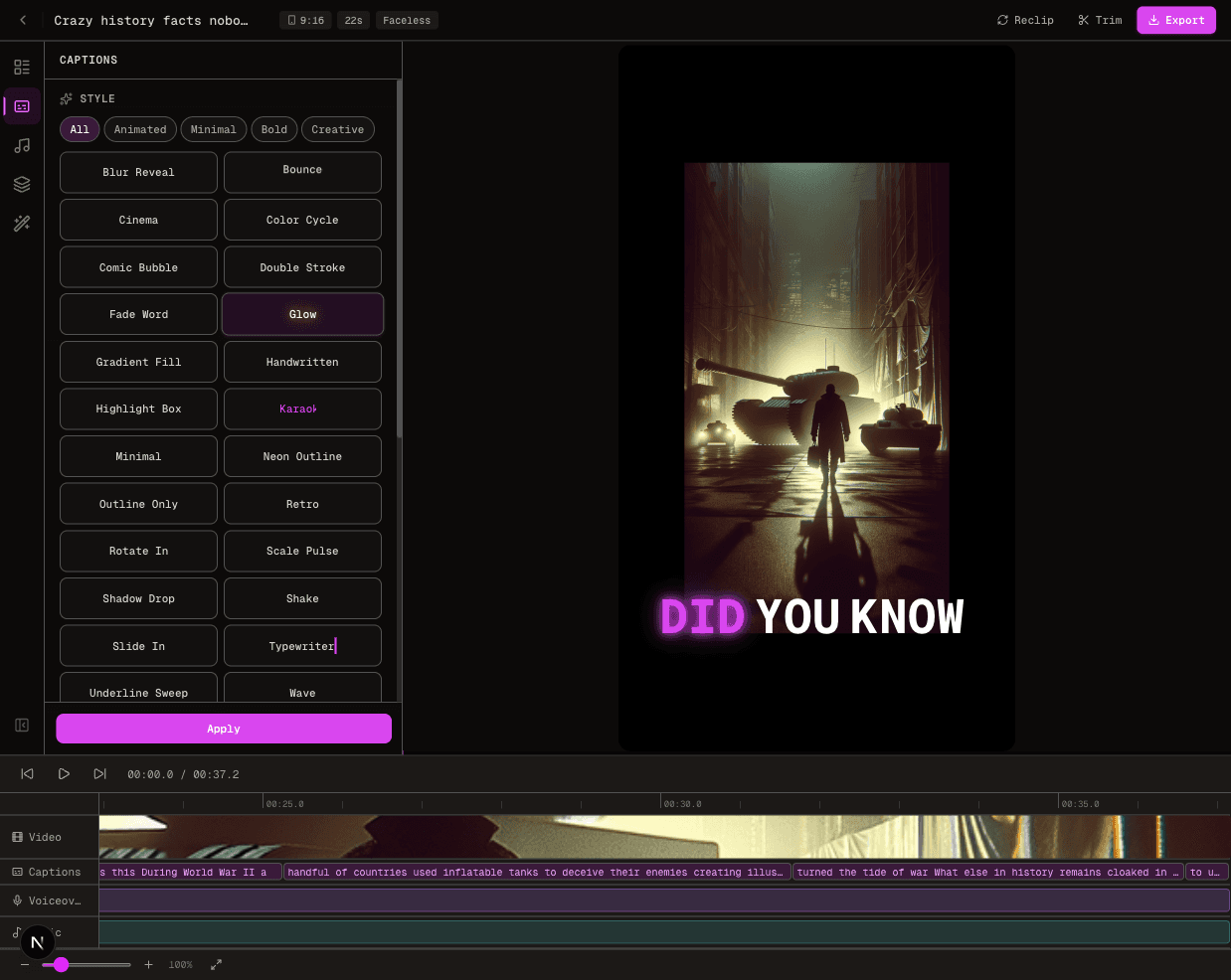
fluxclip.ioEdit every scene on a timeline, extend a shot and add animated captions.
Inpaint, expand, relight and refine images, then upscale the result.
Narrated stories, rhymes and lessons for children, made from an idea.
Turn long text into a narrated audiobook with AI voices.
Make videos and images from your own tools or AI assistants.
Pro and aboveSolutions
Pick the work closest to yours and start from there.
Stickman stories your viewers vote on: thrillers, horror, comedy and fables, with voice and captions. No camera.
Talking-head shorts with word-by-word captions and quick cuts for Reels, Shorts and TikToks.
Creator-style ads and product scenes, made from your own product assets.
Test hooks and ad formats side by side, then keep the version that fits.
Generate an original track, then build the video around it.
Turn a product photo, a customer question or a launch into content.
Develop images, video concepts and voiceovers for a campaign in one workspace.
Faceless videos, ads, images, voice and music all start from one idea. Try yours on the free plan.
The suite
AI video, images, voice and music, plus the editor and publishing around them. No stitching five products together.
Turn a topic or script into scenes, voiceover, visuals, captions and music on an editable timeline.
Creator-style ads from a product URL, script or reference image, with avatars, voice and captions.
UGC, unboxing, tutorial, virtual try-on, ASMR and hyper-motion ads, made from your product.
Generate, edit and compare images across model families, then animate the frame you like.
Start from a still, direct the motion and pick the video model and format.
Natural narration in 38 languages, kept in sync with the music and captions.
Original tracks from text, with style, lyrics, instrumental and length controls.
Make a portrait talk, or re-sync a clip to new audio with a choice of models.
Accurate subtitles in 60+ animated styles built for short-form video.

Scenes, voiceover, captions, music and transitions stay editable after generation.
Plan, approve and schedule posts to the accounts you connect, from the same workspace.

Give the agent a goal. It coordinates research, docs, slides, images, audio and video.
Automatic video creation + publishing
Choose a topic, a voice and a schedule. Autopilot writes, voices, captions and posts each episode to the accounts you connect.
Pick the posting days, times and timezone. New episodes arrive on schedule.
The voice and caption style you choose carry through the whole series.
Word-by-word captions timed to the voice, in 60+ animated styles.
Script, voice, visuals and captions, generated for each episode.
Publish to the 9 social platforms FluxNote supports, from the same workspace.
Choose a topic and story source, then select your format, voice and caption style. A specific theme gives you a more useful starting point than a broad instruction to “make something viral.”
Connect the accounts you manage and choose the posting days, times and timezone. Check that your plan supports the cadence and that publishing permissions are active.
Autopilot generates new episodes and publishes on your chosen schedule. Stay responsible for the content: check available drafts, facts and media rights, and adjust the series when your direction changes.
The newest version of every major model family, in one workspace. Switch models without moving your project.
Pricing
Try it on the free plan, then pick the monthly credits you need. Paying yearly halves the monthly price.
$0
Free to start
100 credits a month1 finished AI video a month (720p)
$10/month
or $5/month billed yearly ($60/yr)
1,000 credits a monthAbout 10 finished videos
$20/month
or $10/month billed yearly ($120/yr)
2,500 credits a monthAbout 25 finished videos
$40/month
or $20/month billed yearly ($240/yr)
6,500 credits a monthAbout 65 finished videos
Prices in US dollars. Credits renew monthly. See Max, Ultra and quarterly billing
Built for creators, brands and teams
The video previews on this page are FluxNote output clips, not stock footage presented as a customer result. Every preview is labelled so you know what you are watching.
Watch the previewsEvery video and image model is listed by name on this page, each linking to its own page, so you can check what is included before creating an account.
See the modelsCurrent pricing, generation allowances and paid feature requirements are available before purchase. Plan requirements are also stated beside the relevant workflow.
Review current plansBring one real idea and test the workflow on a free starting allowance, with no credit card, before choosing a paid plan.
Refine every draft, scene, narration and caption before anything goes out. Results vary with the brief, assets and model you select.
Read what reviewers wrote on G2 and Software Advice, with a direct link to each source.
Read the reviewsWhat you can make, what you can change, and how to get started.
No. Short-form video and Autopilot are part of the platform, not the whole product. You can also create standalone images, product creative, video clips, voiceovers and music, or work on an editable scene-based video. Start with the studio that matches your project.
Create AI videos, images, voiceovers, product ads, UGC-style content and music in one workspace. Build a short-form video from an idea, make individual assets in a studio, or prepare content for your social channels. Available models and tools depend on your plan.
Yes. Scene-based videos have individual scenes, narration, captions, music and timing that you can refine before the final render. The full timeline editor is included with paid plans, so you can replace a visual or adjust one scene while keeping the rest of the project. Video Studio also offers dedicated Edit Video, Extend and Captions modes for clips.
Yes. Image Studio creates images with a choice of AI models. UGC Studio helps turn product photos into creator-style images and video clips, while AD Studio supports product-focused ad variations. The Free plan lets you try Image Studio and preview UGC Studio.
Yes. Generate narration from text, choose a voice and language, and use it in your content. Music Studio generates songs, instrumentals and background tracks from a description. Music generation is a paid feature that uses credits, with options depending on the selected model.
Yes. The Free plan is always free and includes 100 credits every month, about one finished AI video of up to 30 seconds at 720p, plus 100 more credits once for following FluxNote on Instagram and 100 once for TikTok (TikTok is not available in every country), so you can make three videos in your first month. It also includes preview access to UGC Studio. No card is required, no video is watermarked, and the Free plan is for personal and evaluation use.
Yes. Connect the social accounts you manage to publish or schedule completed content. Series automations can create recurring videos and hold them for review before publishing. Publishing and automation access depend on your plan and the permissions of each connected account.
Paid plans include commercial usage rights for social posts, paid ads and client work. The Free plan is for personal and evaluation use.
Not for every workflow. You can start image and video generation with a prompt, or build a faceless video from a topic or script. Other workflows need source material: image-to-video starts with an image, while editing and lip sync may require an existing clip, photo or audio. Follow the inputs shown in your chosen studio.
Supported aspect ratios depend on the studio and model. Choose the available ratio for your intended placement before generating. Check the final framing and caption placement rather than assuming one export will fit every channel; resolution and export options also depend on your plan.
No. One workspace does not mean unlimited generation or that every feature is free. Models and workflows have different credit costs, video allowances and plan requirements. Use the free plan to evaluate the available tools, then check the pricing page and the cost shown in the app before upgrading or generating.
That idea you’ve been sitting on?
Start free. No credit card required.