Give the series a clear brief.
Choose a topic and story source, then select your format, voice and caption style. A specific theme gives you a more useful starting point than a broad instruction to “make something viral.”
YOUR ALL-IN-ONE AI CREATIVE STUDIO
Create images, short-form and long-form videos, faceless content and ads. Edit in one studio, then automate recurring video publishing with Autopilot.
Free to start. No credit card required.
Want videos created and posted for you? See AutopilotImages. Video. Voice. Editing.
One workspace, without juggling separate tools.
INDEPENDENT CUSTOMER REVIEWS
Feedback published on independent review platforms, with a direct link to each source.
“Everything in one place makes the process smoother.”
“The initial setup is almost friction-free and requires zero technical background.”
“FluxNote turns a simple idea into a polished video with minimal effort.”
Short excerpts from independently published reviews. Reviewers' experiences are their own, and individual results vary. Sources checked October 11, 2026.
From inspiration to your own creation
Videos, images and ads. One creative studio. Pick what you want to make—or try the walkthrough before you sign up.
Turn your next story into a faceless video. Explore the workflow, then create your own in FluxNote.
Start with an account. Create at your own pace.
Loading walkthrough… Full-screen link below if needed.
Tool access and generation allowances depend on your plan.
Video ↗ Images ↗ Faceless ↗ Ads ↗ Audio
AUTOMATIC VIDEO CREATION + PUBLISHING
Post every day. Film nothing.
Not just a scheduler. Autopilot creates fresh videos for a recurring series—with scripts, AI voiceovers, visuals and captions—and publishes them to your connected accounts on the schedule you choose.
Set your topic, format, voice and posting times once. Keep your series direction and account connections up to date instead of starting every video from scratch.
Set up my video seriesCreate an account to get started. Automation and publishing require an eligible paid plan.
Your topic → fresh video → scheduled post
Choose a topic and story source, then select your format, voice and caption style. A specific theme gives you a more useful starting point than a broad instruction to “make something viral.”
Connect the accounts you manage and choose the posting days, times and timezone. Check that your plan supports the cadence and that publishing permissions are active.
Autopilot generates new episodes and publishes on your chosen schedule. Stay responsible for the content: check available drafts, facts and media rights, and adjust the series when your direction changes.
TikTok · YouTube · Instagram — supported account types and publishing permissions apply.
AI VIDEO STUDIO / PLAY THE OUTPUT
Cinematic worlds, action sequences and commercial-style ideas from FluxNote’s Inspiration collection. Explore the output, then start with your own idea.
Cinematic worlds
A quiet mountain scene becomes a creature reveal.
15-second AI Studio example · Press play
Create in AI Video Studio ↗Action & transformation
A medieval rider transforms in one continuous action scene.
15-second AI Studio example · Press play
Create in AI Video Studio ↗Atmosphere & camera movement
A coastal scene, an orbiting camera and a sky full of birds.
15-second AI Studio example · Press play
Create in AI Video Studio ↗Commercial-style creative
A golf-ball flight becomes the centre of a visual concept.
15-second AI Studio example · Press play
Create in AI Video Studio ↗These are short preview clips, not full-length video examples. Results and available models depend on your input and plan.
01 / PICK YOUR MEDIUM
A story for your channel, a visual for your brand or an ad for your next launch. Start with the output you need, then build the rest around it.
Start with words, an image or an existing clip. Direct the shot, shape the motion and finish with captions—all in the same workspace.
Start and end frames, extension and editing are available with supported models. Access and generation limits depend on your plan.
Make a product reveal, a cinematic scene or a visual for your next explainer. Start with one shot before building a longer sequence.

Create thumbnails, product scenes and illustrated concepts. Describe the subject, setting and style; refine the result with references where supported.
Try Image StudioUGC & PRODUCT ADS
Start with product assets and a script. Explore presenter-led creative, different hooks and product scenes. Review the claims and likenesses before using an ad.
Explore ad creation
FACELESS VIDEO / FORMAT LIBRARY
Choose a format for your story, explainer or narrated scenes. Build around a topic or script, with visuals, voice and captions instead of a camera recording of you.


Format thumbnails—not playable videos. Review names, facts and pronunciation before publishing.
Make a faceless videoTurn a script into narration, generate a soundtrack or synchronize audio with a face in Lip Sync Studio. Choose the voice, language and music direction that suit the project.
Listen for pronunciation and pacing. Use only voices, faces and source audio you have permission to use.
Explore audio toolsStart free with limited video and image allowances. Premium models, UGC generation and other advanced tools depend on your plan. See what’s included ↗
02 / KEEP YOUR CREATIVE SAY
You don’t need a different subscription for every creative step. FluxNote brings generation tools and editing workflows into one workspace, so you can build the pieces and shape the final result.
Start with a topic, script, product photo or reference. Choose the studio that matches your output: an image, a clip, an ad or a narrated video.
Set the style, voice and format available in that workflow. Generate a small first draft and review it before spending credits on more variations.
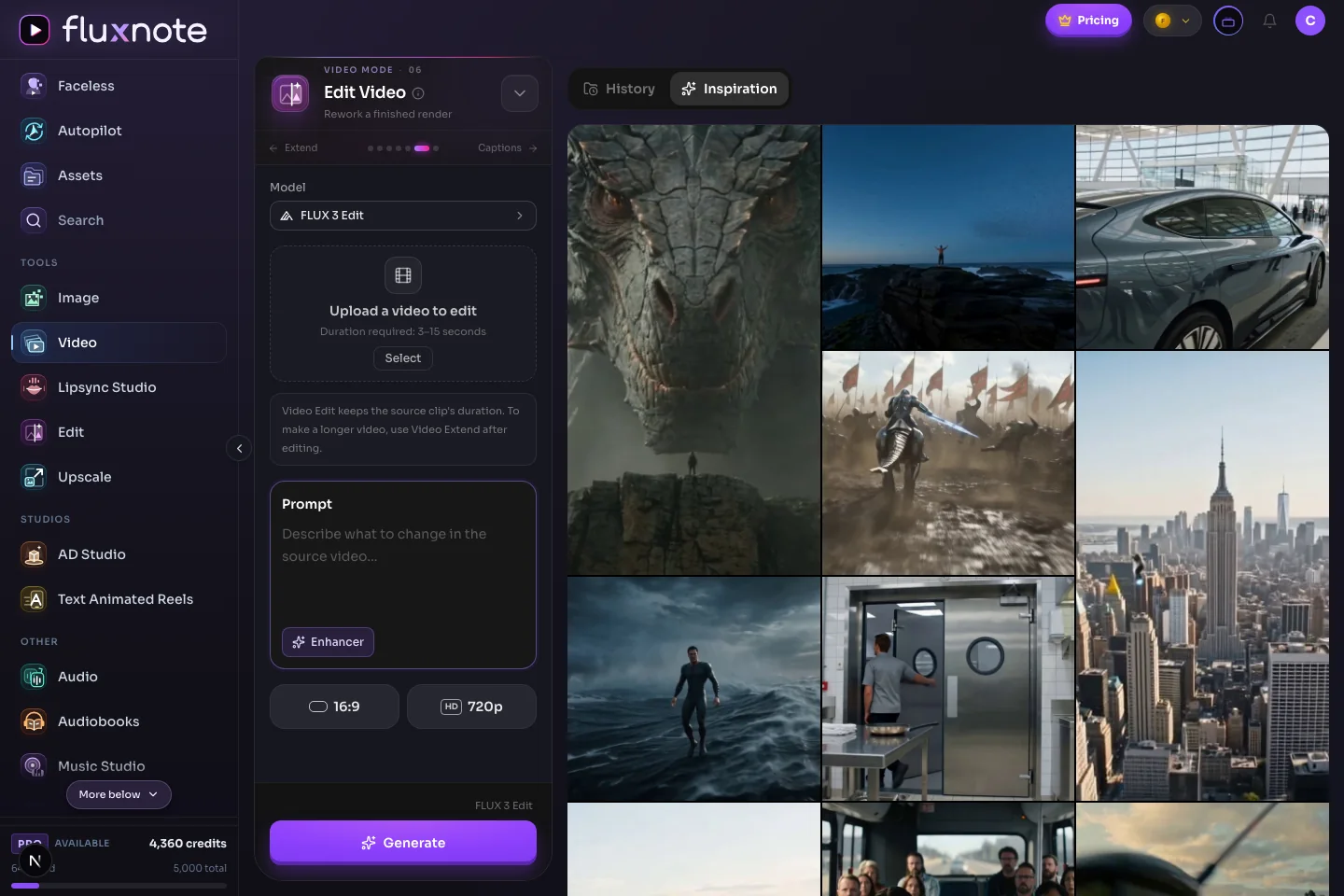
In a scene-based project, refine visuals, narration, captions, music and timing. For individual clips, use the available video editing modes.
Check the final output, then download it for your campaign or use supported publishing workflows. Set up a recurring series when you need a regular schedule.
Full timeline editing and publishing require an eligible plan. Controls and supported inputs vary by studio.
BUILT AROUND YOUR WORK
You don’t have to use every tool on day one. Pick one real task and use the studio to take it from an idea to something you can review.
Creators & faceless channels
Start with a story, lesson or topic. Pair narration with visuals and captions, then refine the pacing before publishing. Create without making yourself the person on camera.
Try: a narrated explainer with illustrated scenes.
Create a channel videoFounders & small businesses
Turn a product photo, a customer question or a launch announcement into content. Make a visual, explain the benefit in a video, and keep the language specific to your business.
Try: a product introduction and a matching social image.
Start a business projectBrands & online stores
Explore product scenes and creator-style ads using your own assets. Test different hooks and scripts, check that every product detail is accurate, and choose the version that fits your campaign.
Try: two ad concepts for the same product benefit.
Explore product creativeAgencies & marketing teams
Develop images, video concepts and voiceovers for a campaign in one workspace. Refine the creative against the brief and export the work for client review before it goes live.
Try: a campaign concept in image and narrated-video form.
Bring your briefExamples are project ideas, not promised results. Commercial usage and advanced creation tools depend on your plan.
Built for creators, brands and teams
See real output previews, an actual editor screenshot, current plan requirements and clear policies before you create. Examples are labelled and customer results will vary.
FREE TO START / NO CARD REQUIRED
Bring one real idea and test the workflow before choosing a paid plan. Your project stays editable, and results will vary with the brief, assets and model you select.
Free starting allowance. No credit card required.
The video previews on this page are FluxNote output clips, not stock footage presented as a customer result. Every preview is labelled so you know what you are watching.
Watch the previewsThe workflow section includes an actual FluxNote editor screenshot. Open it full size and inspect scenes, narration, captions and the timeline before creating an account.
See the workflowCurrent pricing, generation allowances and paid feature requirements are available before purchase. Plan requirements are also stated beside the relevant workflow.
Review current plansTHAT IDEA YOU’VE BEEN SITTING ON?
Questions, answered
What you can make, what you can change, and how to get started.
No. Short-form video and Autopilot are part of the platform, not the whole product. You can also create standalone images, product creative, video clips, voiceovers and music, or work on an editable scene-based video. Start with the studio that matches your project.
Create AI videos, images, voiceovers, product ads, UGC-style content and music in one workspace. Build a short-form video from an idea, make individual assets in a studio, or prepare content for your social channels. Available models and tools depend on your plan.
Yes. Scene-based videos have individual scenes, narration, captions, music and timing that you can refine before the final render. The full timeline editor is included with paid plans, so you can replace a visual or adjust one scene while keeping the rest of the project. Video Studio also offers dedicated Edit Video, Extend and Captions modes for clips.
Yes. Image Studio creates images with a choice of AI models. UGC Studio helps turn product photos into creator-style images and video clips, while AD Studio supports product-focused ad variations. The Free plan lets you try Image Studio and preview UGC Studio.
Yes. Generate narration from text, choose a voice and language, and use it in your content. Music Studio generates songs, instrumentals and background tracks from a description. Music generation is a paid feature that uses credits, with options depending on the selected model.
Yes. The Free plan includes one AI-produced video per month at 720p, 100 credits to try Image Studio and preview access to UGC Studio. No card is required.
Yes. Connect the social accounts you manage to publish or schedule completed content. Series automations can create recurring videos and hold them for review before publishing. Publishing and automation access depend on your plan and the permissions of each connected account.
Paid plans include commercial usage rights for social posts, paid ads and client work. The Free plan is for personal and evaluation use.
Not for every workflow. You can start image and video generation with a prompt, or build a faceless video from a topic or script. Other workflows need source material: image-to-video starts with an image, while editing and lip sync may require an existing clip, photo or audio. Follow the inputs shown in your chosen studio.
Supported aspect ratios depend on the studio and model. Choose the available ratio for your intended placement before generating. Check the final framing and caption placement rather than assuming one export will fit every channel; resolution and export options also depend on your plan.
No. One workspace does not mean unlimited generation or that every feature is free. Models and workflows have different credit costs, video allowances and plan requirements. Use the free plan to evaluate the available tools, then check the pricing page and the cost shown in the app before upgrading or generating.