Guide
Adobe ExpressInstagram ReelsSocial Media VideoVideo Editing SoftwareAdobe Express Alternative for Reels: FluxNote Compared
Looking beyond Adobe Express? Explore FluxNote for script-led and faceless Reels, with images, video and editing in one creative workspace. Choose by the work you need to do—not an unsupported speed promise.
By the FluxNote Editorial Team

When FluxNote is worth trying for Reels
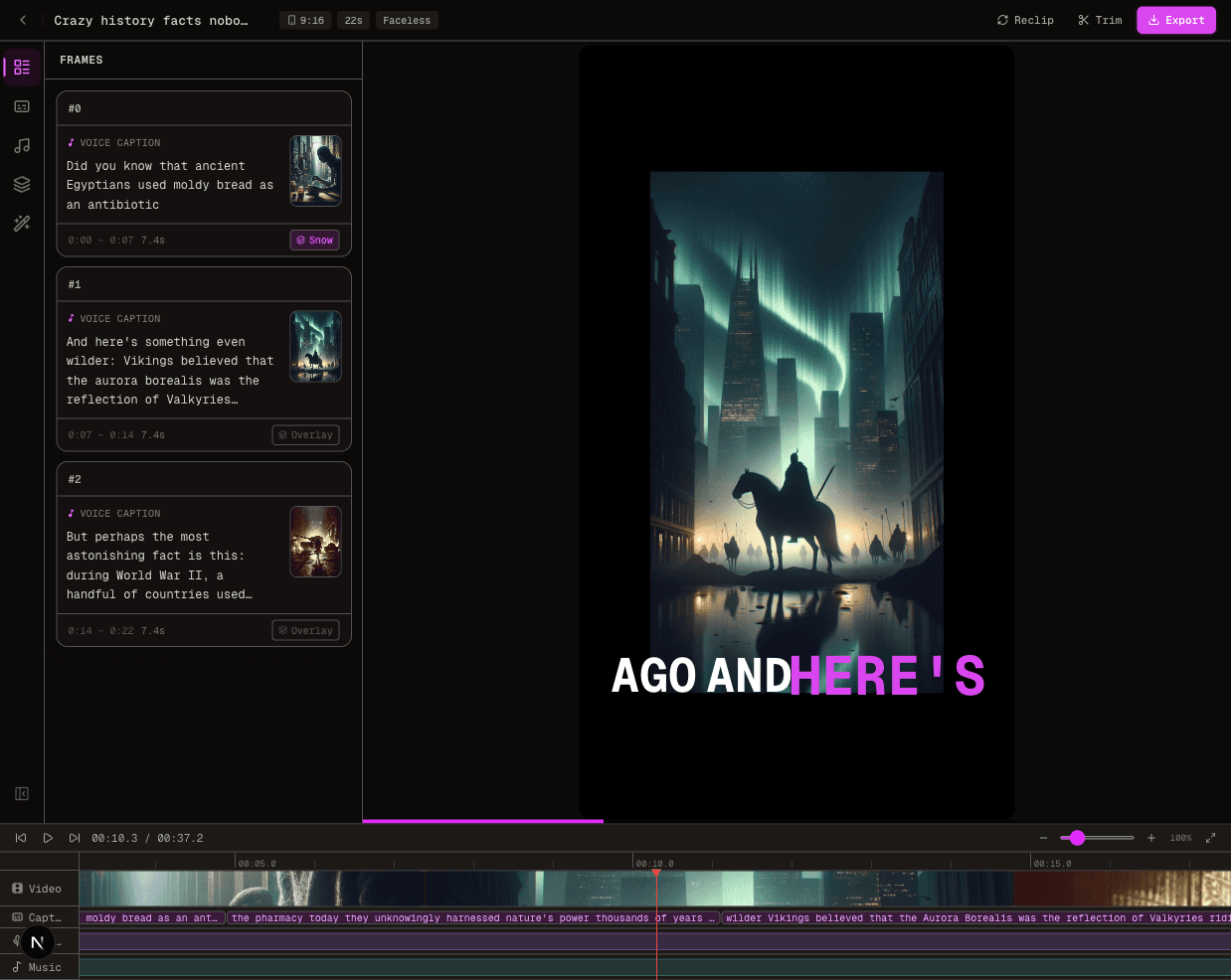
FluxNote is an option when creating the first draft is your bottleneck: you have a topic or script but still need visuals, narration and captions. Explore a faceless format, review the generated project and make corrections before publishing.
This guide is published by FluxNote. It is a first-party workflow comparison, not an independent ranking or a claim that five tools were tested. If Adobe Express already fits your design and editing process, there is no reason to switch without testing a representative project.
Adobe Express vs FluxNote: compare the workflow
| Decision | Adobe Express | FluxNote |
|---|---|---|
| Starting point | Templates, uploaded media or a blank design | Topic, script, image or a selected video format |
| AI creation | Generate Video supports text prompts and optional starting images | Image, video and faceless creation workflows |
| Reels production | Instagram templates and video editing tools | Generated scenes, voiceover and captions to review and edit |
| What to test | Template customization and your required editing tools | Scene relevance, narration, caption readability and finishing work |
| Before subscribing | Verify your selected plan and generation allowance | Verify model access and generation allowances on your plan |
Sources: Adobe Instagram video maker, Adobe Generate Video documentation, FluxNote creative studio and FluxNote plans.
This table does not imply identical features or interchangeable credits.
Create a representative Reel in FluxNote
- 1Create a FluxNote account and choose a relevant video workflow.
- 2Add one original idea or short script. For example: explain three ways to reuse a product's packaging, with a visual for each point.
- 3Review the scenes and narration for accuracy and relevance. Correct names, claims and pronunciation.
- 4Check captions and timing on a phone-sized preview. Use the editing controls available on your plan.
- 5Verify rights, format and export conditions before posting.
Generation time and results vary. This is a suggested evaluation workflow, not a timed product test or a promise of publishing-ready output from every prompt.
Use the same brief to compare both tools
Keep the script, visual requirements, duration and target aspect ratio the same. Record the work remaining after the first draft instead of comparing two unrelated outputs.
| Check | What to record |
|---|---|
| Visual accuracy | Which scenes need replacing? |
| Voice and captions | Which words need correcting? |
| Editing effort | What manual work remains? |
| Allowances | What did the test consume? |
| Export | Is the resolution and branding suitable? |
Adobe Express supports AI video generation; the earlier claim that it lacks text-to-video was incorrect. The old unverified competitor-price and caption-style counts have also been removed. Check each provider's current plan rather than relying on a stale comparison.
Which should you choose?
Keep Adobe Express if its template and media-editing workflow already covers your needs. Try FluxNote if you want to evaluate script-led or faceless creation alongside image and video tools in one workspace. Neither choice guarantees views, sales or a particular production speed.
Try your Reel idea in FluxNote. Check current plan limits before choosing paid features. Start with one project you genuinely want to publish, then decide whether the output and remaining editing work fit your process.
Create Videos With AI
From inspiration to your own creation
Put your next idea into action.
Videos, images and ads. One creative studio. Pick what you want to make—or try the walkthrough before you sign up.
Your ideas. Your videos. No camera required.
Turn your next story into a faceless video. Explore the workflow, then create your own in FluxNote.
- 01 Choose a style
- 02 Add your idea
- 03 Make it your own
Start with an account. Create at your own pace.
Loading walkthrough… Full-screen link below if needed.
Tool access and generation allowances depend on your plan.
Frequently Asked Questions
Related Resources
- Guide7 Best Zebracat Alternatives 2026
- GuideAgency Ad Production: A FluxNote Workflow Guide
- ToolText to Video AI: Turn Text Into Videos [Fast]
- ToolAI Voiceover Generator: 6 Voices [Tested]
- use-caseAI Video for E-Commerce: Product Demos [Free]
- AlternativeFree Adobe Express Alternative? [2026] | FluxNote
- GuideFluxNote vs Adobe Express: AI Video for Business