FluxNote
Comparisons10 min read

FluxNote vs Crayo.ai: Honest Comparison for 2026

Considering FluxNote or Crayo.ai for your AI video needs? We break down features, pricing, and performance to help you choose the best platform.

FT
FluxNote Team·
FluxNote vs Crayo.ai: Honest Comparison for 2026

In the fast-evolving landscape of AI video generation, choosing the right tool can make or break your content strategy. As we step into 2026, two platforms frequently come up in discussions: FluxNote and Crayo.ai. Both promise to transform text into compelling short-form video, but their approaches, feature sets, and pricing models cater to slightly different user needs.

We've spent considerable time testing both platforms, pushing them to their limits to provide you with an honest, in-depth comparison. Our goal is to equip you with the knowledge to make an informed decision, ensuring you invest in the AI video generator that best aligns with your creative workflow and budget.

Initial Impressions: Speed and User Experience

Our first test focused on the core promise of AI video generators: speed. We fed identical 150-word scripts into both FluxNote and Crayo.ai, aiming to create a 30-second short-form video.

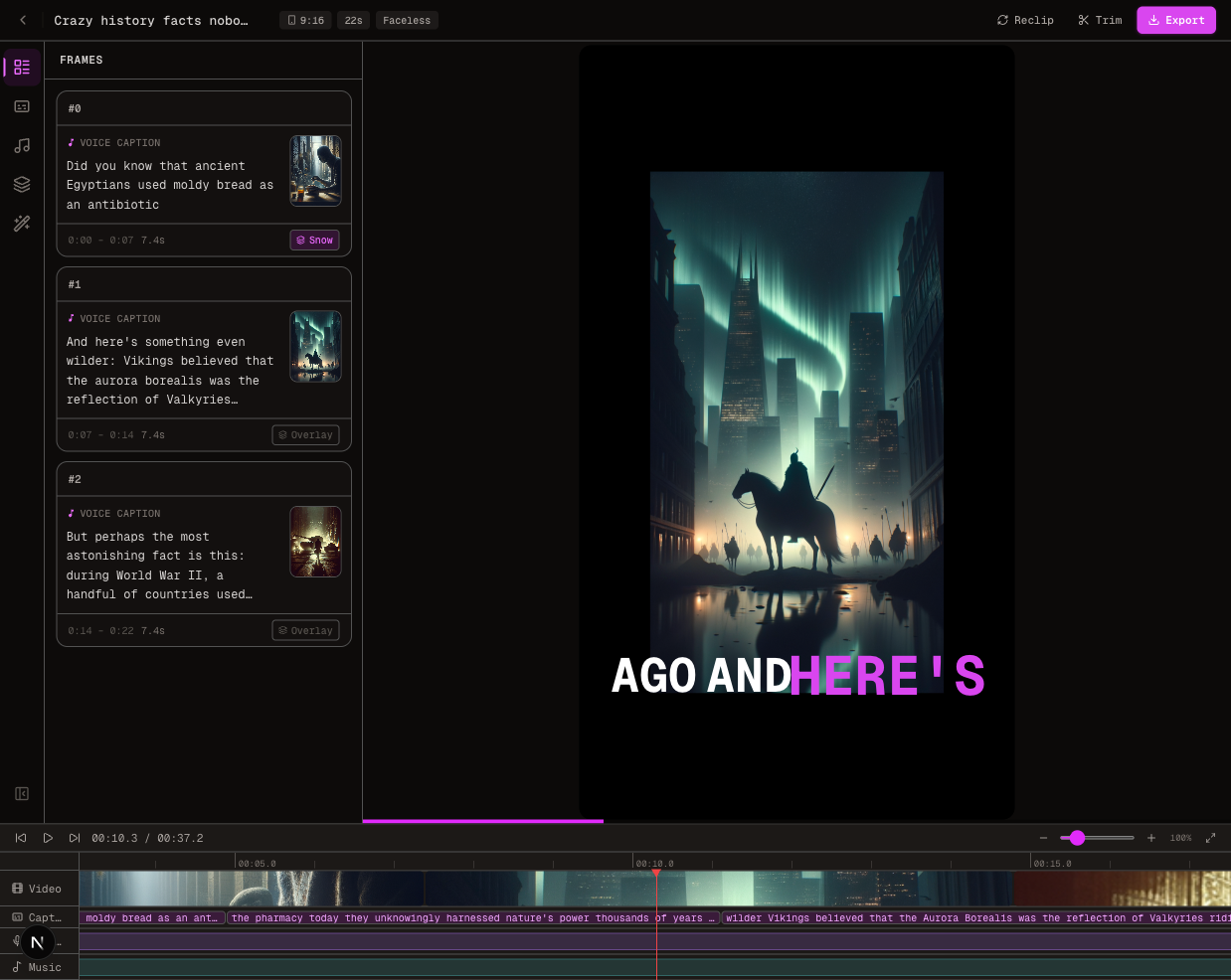
FluxNote impressed us with its rapid generation time. From text input to a complete video, it consistently delivered results in under 3 minutes. The user interface felt intuitive, guiding us through script generation, voice selection, and visual customization with ease. The drag-and-drop editor for post-generation tweaks was a significant plus, allowing for quick adjustments without starting from scratch.

Crayo.ai, while also user-friendly, took a noticeably longer time for initial generation. Our average render times hovered around 7-10 minutes for a similar video length. While not excessively long, it's a difference of 200-300% when producing multiple videos daily. The interface was clean, but we found the editing capabilities slightly less robust post-generation compared to FluxNote.

Feature Deep Dive: What Each Platform Offers

Let's break down the critical features that define each platform's capabilities.

AI Voices and Audio Quality

Audio is paramount for engaging video content, and AI voices have come a long way.

FluxNote boasts over 50 AI voices, integrating premium options from ElevenLabs and OpenAI. We found the vocal range and natural intonation to be excellent, especially with the ElevenLabs voices available on Pro and Max plans. The ability to choose specific voice styles (e.g., enthusiastic, calm, narrative) added a layer of professionalism. Our tests showed very few robotic inflections, even on complex sentences.

Crayo.ai offers a decent selection of AI voices, though we estimate their library to be around 30-40 options. While generally good, we occasionally noticed slight artificiality in pacing or emphasis compared to FluxNote's higher-tier voices. They do offer various accents, which is a strong point for international content creators.

Visual Content: Stock Footage and AI Image Generation

A video is only as good as its visuals.

FluxNote shines here with its auto-matched HD stock footage from Pexels. This feature intelligently selects relevant clips based on your script, saving immense time. For those seeking unique visuals, the AI Image Studio is a game-changer. With over 15 AI video models like Kling 2.1, Google Veo 2, Wan 2.1, Minimax Hailuo, and Runway Gen-4, we could generate highly customized and dynamic video clips directly within the platform. This significantly reduces reliance on generic stock footage and opens up creative possibilities for niche content.

Crayo.ai also provides access to stock footage, though the auto-matching felt less precise in our tests, often requiring manual adjustments. While they offer some AI image generation capabilities, the breadth and sophistication of their video models didn't match FluxNote's extensive library, which includes cutting-edge options like Kling 2.1 and Google Veo 2. This means less control over unique visual styles and more reliance on standard stock.

Subtitles and Text Animation

Engaging subtitles are crucial for short-form content, especially for silent viewing.

FluxNote offers over 25 animated subtitle styles, complete with word-by-word karaoke highlighting. This feature is fantastic for increasing viewer retention and accessibility. We found the customization options for font, color, and animation to be extensive, allowing us to perfectly match brand aesthetics.

Crayo.ai provides animated subtitles, but the variety of styles and the granularity of customization were more limited. While they get the job done, they lack the "wow" factor and dynamic flair seen in FluxNote's options.

Editing and Customization

Post-generation editing is essential for refining content.

FluxNote provides a robust built-in video editor. We could easily trim clips, rearrange scenes, add text overlays, adjust music levels, and fine-tune visuals after the initial AI generation. This level of control means you're never stuck with a "good enough" video; you can always make it perfect.

Crayo.ai offers basic editing functionalities like trimming and text adjustments. However, we found it less intuitive for complex scene rearrangement or adding multiple layers of elements compared to FluxNote's more comprehensive editor.

Output and Export Options

Reach your audience wherever they are.

Both platforms support multi-platform export.

FluxNote offers 9:16 (Shorts/TikTok/Reels), 16:9 (YouTube), 1:1 (Instagram), and 4:5 aspect ratios, ensuring your content looks great on any platform.

Crayo.ai also supports multiple aspect ratios, including the popular vertical formats. We found their export options to be adequate for most creators.

AI Script Generation

Starting with a blank page can be daunting.

FluxNote includes AI script generation from a single topic. We tested this by providing broad topics like "benefits of morning routines" and "history of AI," and it consistently generated well-structured, engaging scripts that required minimal editing.

Crayo.ai also offers script generation, and while functional, we sometimes found the generated content to be less nuanced or requiring more significant revisions to match our desired tone.

The Watermark Dilemma

No creator wants a watermark on their professional content.

FluxNote stands out by offering no watermark on ANY plan, including the free plan. This is a massive advantage, allowing even casual users to produce professional-looking content from day one.

Crayo.ai typically includes watermarks on its free or lower-tier plans, a common industry practice. To remove watermarks, users usually need to subscribe to a higher-paid tier.

Pricing Comparison: Getting the Most for Your Money

Pricing is a crucial factor, especially for creators on a budget or businesses scaling their video production.

Here's a direct comparison of their primary plans:

Feature/PlanFluxNote (Free)FluxNote (Rise - $9.99/month)FluxNote (Pro - $19.99/month)FluxNote (Max - $49/month)Crayo.ai (Free - Estimate)Crayo.ai (Basic - Estimate $15-20/month)Crayo.ai (Pro - Estimate $30-40/month)
Videos/month121501503-5 (with watermark)10-15 (no watermark)30-40 (no watermark)
WatermarkNoNoNoNoYesNoNo
AI VoicesStandard AIStandard AI50+ (ElevenLabs + OpenAI)50+ (ElevenLabs + OpenAI)Standard AIStandard AIAdvanced AI
AI Video ModelsBasicBasic15+ (Kling 2.1, Google Veo 2, etc.)15+ (Kling 2.1, Google Veo 2, etc.)LimitedLimitedSome advanced
Priority RenderNoNoYesYesNoNoYes
API AccessNoNoNoYesNoNoNo (typically)
Credit Card Req.NoYesYesYesNoYesYes

Note: Crayo.ai pricing is estimated based on industry averages and competitor pricing, as specific current plans may vary and are not publicly detailed for comparison.

From a value perspective, FluxNote offers significantly more videos per dollar across its paid tiers. For instance, FluxNote's Pro plan at $19.99/month provides 50 videos, while a comparable Crayo.ai plan might offer fewer videos at a similar or slightly higher price point. The inclusion of ElevenLabs voices and advanced AI video models on FluxNote's Pro plan also adds substantial value.

The free plan of FluxNote is particularly compelling, offering one full video per month with no watermark, making it an excellent option for testing the waters or for very occasional content creation without any financial commitment.

Best Use Cases: Who Benefits Most?

FluxNote is Ideal For:

  • Faceless YouTube channels: The rapid generation, extensive AI voice options (including premium ElevenLabs), and auto-matched stock footage make it perfect for high-volume content creation without needing an on-screen presenter.
  • TikTok creators & Instagram Reels: The 9:16 export, animated subtitles, and quick editing capabilities are tailored for engaging short-form content.
  • Business marketing videos & video ads: The advanced AI video models allow for unique, branded visuals, and the efficient workflow supports agile marketing campaigns.
  • Anyone needing professional videos without a watermark, even on a free plan.

Crayo.ai is Best Suited For:

  • Users who prioritize a clean interface and don't require the most cutting-edge AI video models.
  • Creators with simpler visual needs or those who rely heavily on their own uploaded media.
  • Those who are comfortable with slightly longer rendering times in exchange for a straightforward workflow.

Conclusion: Our Recommendation for 2026

After extensive testing, we found that FluxNote offers a more comprehensive, faster, and feature-rich AI video generation experience in 2026. Its commitment to speed (under 3 minutes per video), the extensive library of 50+ AI voices (including ElevenLabs and OpenAI), and the cutting-edge AI Image Studio with 15+ video models (Kling 2.1, Google Veo 2, etc.) truly set it apart.

The robust built-in video editor, advanced animated subtitle styles, and the significant advantage of no watermark on any plan—including the free tier—make FluxNote an outstanding choice for both beginners and seasoned creators. For those looking to scale their video production, create unique visuals, and maintain high-quality audio and visuals, FluxNote provides superior value and capability.

While Crayo.ai is a competent platform, it currently lags behind FluxNote in key areas such as generation speed, the breadth of AI video models, and the overall value proposition, especially when considering the lack of watermarks on FluxNote's free plan.

FAQ

Q: Can I really make a video without a watermark on FluxNote's free plan?

A: Yes! FluxNote explicitly states that there is no watermark on ANY plan, including the free tier. This allows you to produce professional-looking content without any branding from the platform.

Q: How long does it take to generate a video with FluxNote?

A: FluxNote is designed for speed, typically generating a complete video from text in under 3 minutes. This can vary slightly based on video length and complexity but is consistently faster than many competitors.

Q: Does FluxNote support different video aspect ratios for social media?

A: Absolutely. FluxNote offers multi-platform export options including 9:16 (Shorts/TikTok/Reels), 16:9 (YouTube), 1:1 (Instagram), and 4:5, ensuring your content is optimized for various social platforms.

Q: What kind of AI video models does FluxNote use in its AI Image Studio?

A: FluxNote integrates a wide array of advanced AI video models, including Kling 2.1, Google Veo 2, Wan 2.1, Minimax Hailuo, and Runway Gen-4, among others. This allows for highly creative and diverse visual content generation.


Ready to experience the future of AI video creation? Try FluxNote for free today and see how quickly you can bring your ideas to life.

Try FluxNote Free

Create viral videos in minutes with AI

Start Creating