AI Kiss Generator: Photo to Kissing Video

The short answer

AI kiss generator: turn a photo of two people into a short kissing video. Describe the kiss, pick a model and generate. Credit-based; for people who agreed.

Generation consumes credits; availability and cost depend on the selected video model.

Start frame: One image of both peopleMotion control: Natural-language promptGeneration controls: Model, duration and resolution
Make a short kiss animation (FluxNote illustration)

Direct answer

What is AI Kissing Video Generator?

An AI kissing video generator, also called an AI kiss generator, turns a still photo of two people into a short clip in which they lean in and kiss. In FluxNote you do it with image-to-video: upload a photo or create one in Image Studio, describe the kiss in the motion prompt, choose a video model and generate. It is a credit-based feature, not a free one-tap filter, and it is for photos of people who have agreed to appear in the clip.

Category guide

Understanding AI Kissing Video Generator

Product information reviewed October 2026

An AI kissing video generator animates a still image so that two people lean toward each other and kiss. The photo fixes who they are, how they look and where they are; the model invents the frames in between. Because the clip is generated, small details such as faces, hands and teeth can shift from frame to frame, so the result is best treated as a short, stylized moment rather than footage.

FluxNote does this through image-to-video, not a one-tap filter. You supply a start image, write the motion in plain language and choose a video model, duration and resolution. That gives you more control than a fixed template, because you decide the pace, the camera and the mood, but it also leaves more to get right: a clear photo and one clear instruction matter more than a long prompt.

The feature is credit-based, so each generation costs credits and the cost for the selected model is shown before you render. Use it for photos of yourself and of people who have agreed to appear. FluxNote's Terms prohibit deepfakes of real people without their consent and obscene or pornographic content, and a model's own safety filters can refuse a request.
Key insights

The practical facts first

  • As a general rule, a sharp photo with both faces visible and turned toward each other is the strongest start frame.
  • One motion per clip works best: lean in, kiss, pull back. Several competing actions in one prompt are less reliable.
  • The prompt should describe the movement and the camera, not repeat what the photo already shows.
  • Models differ in realism, motion strength, speed, duration and resolution, so switching model is the first fix when a result misses.
  • Animate to Video is a paid, credit-based feature rather than an unlimited free generator.
  • Consent comes first: use photos of yourself or of people who have agreed to appear.

Capabilities

Built for the complete job, not one isolated step

01

You direct the kiss

Write the motion yourself: how slowly they lean in, where the camera sits and the mood, instead of accepting one fixed filter.

02

Choose the video model

Models differ in realism, motion strength and speed. Pick one for the shot and rerun with another if the first result misses.

03

Your photo or a generated one

Upload a photo of you and a partner, or create a start frame in Image Studio for original characters and story scenes.

04

Keep working in FluxNote

Download the clip, or place it in a larger video with captions, music and voiceover in the editor.

Product facts

Inputs, controls and output

These are the capabilities exposed by the current FluxNote workflow. Model-specific limits and availability can vary.
Start frame
One image of both people
Upload a photo or use an Image Studio result. Both people should be in the image.
Motion control
Natural-language prompt
Describe who moves, how slowly and where the camera sits.
Generation controls
Model, duration and resolution
Options vary according to the selected video model.
Prompt assistance
Optional enhancement
Prompt enhancement can turn short direction into fuller motion guidance.
End state
Optional end image
Models that support it can be guided toward a final frame, for example the moment after the kiss.
Output
Downloadable video clip
Review the clip, then download it or use it in a larger edit. FluxNote does not watermark video on any plan.
Access
Paid feature
Generation consumes credits; availability and cost depend on the selected video model.

Workflow

How it works

The workflow is intentionally short: provide the creative direction, let FluxNote assemble the production work, then review before publishing.
  1. 1

    Choose a clear photo

    Use a sharp photo with both faces visible and turned toward each other. Only use photos of people who have agreed.

  2. 2

    Describe one kiss

    Write a single motion, for example: the two people lean in slowly and share a short, gentle kiss while the camera stays steady.

  3. 3

    Pick the model and generate

    Choose a video model, duration and resolution, check the credit cost shown before you render, then generate.

  4. 4

    Review, rerun or edit

    If faces drift or the kiss does not land, adjust the prompt or switch model. Then download the clip or edit it.

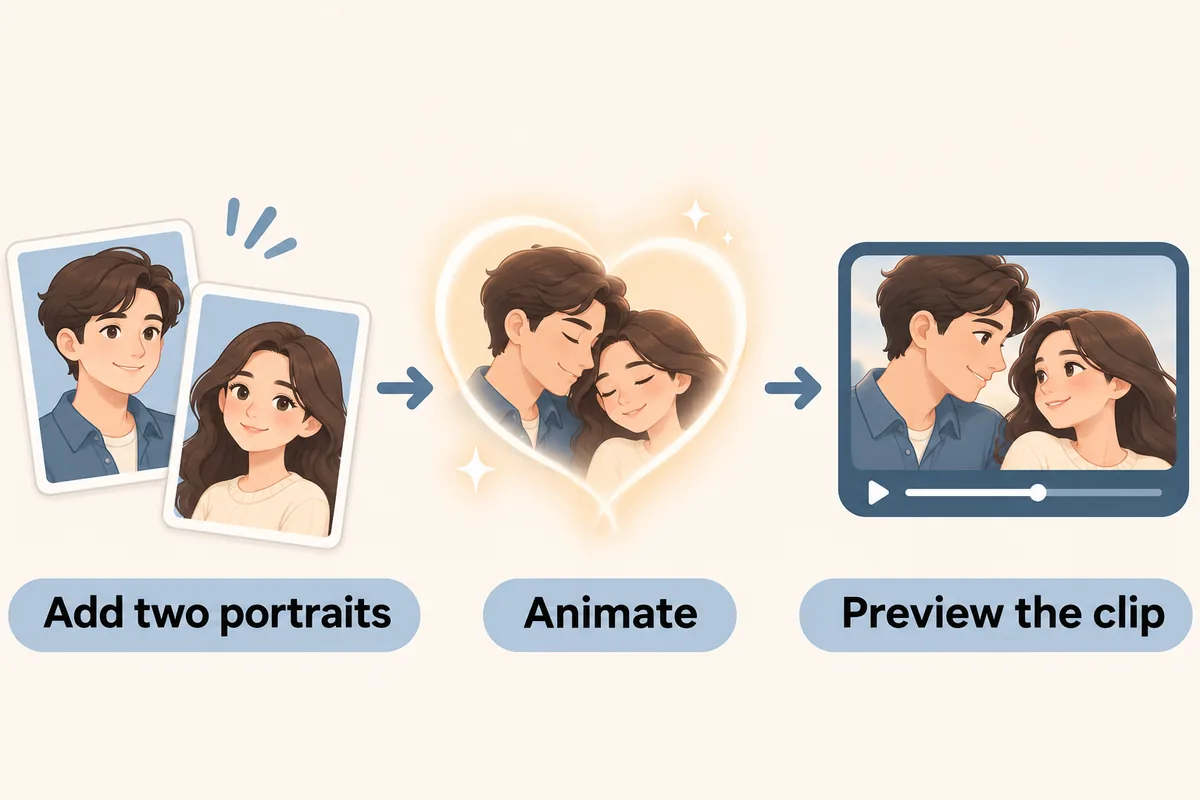
How it works: Add two portraits, then animate, then preview the clip

Create with FluxNote

Open AI Kissing Video Generator in FluxNote

AI kiss generator: turn a photo of two people into a short kissing video. Describe the kiss, pick a model and generate. Credit-based; for people who agreed.

Make a Kissing VideoGeneration consumes credits; availability and cost depend on the selected video model.

Decision guide

Choose the workflow based on the job

Slow, gentle kiss

Best when

Both faces must stay recognizable.

Ask for a slow lean-in, a short kiss and a steady camera. Restrained motion gives the model fewer chances to change faces.

Cinematic push-in

Best when

The clip is a story scene or an anniversary or wedding post.

Add one camera move, such as a slow push-in, and keep the kiss itself simple.

Use an end frame

Best when

You know how the shot should finish.

On models that support it, supply an end image whose faces and lighting match the start photo.

Workflow comparison

Prompted image-to-video vs. one-tap kiss filters

Decision pointFluxNote workflowOne-tap kiss filter
Control over the kissYou write the motion, pace and cameraA fixed motion chosen by the template
EffortA photo, a sentence and a model choiceOften one tap, which is quicker
Model choiceSeveral video models to try on the same photoWhatever the app uses
CostCredits per generation, shown before you renderVaries by app
Best useDirected moments, story scenes and polished postsQuick, casual clips

Honest guidance

Limits and review points

  • Faces, hands and teeth can change when the model invents new frames; review every frame before you post.
  • A clip should contain one clear action. A longer romantic sequence is more reliable as separate clips.
  • Small, turned-away, shadowed or covered faces (sunglasses, masks, hands) give the model less to work with.
  • A model's safety filters can refuse or change a request. If a generation fails, adjust the prompt or the photo, or try another model.
  • Model availability, allowed duration and resolution are not identical across every option.
  • FluxNote does not promise free unlimited generation: image-to-video uses paid credits. If you only want one tap and no prompt, a template app may be quicker.

Use cases

What can you create with AI Kissing Video Generator?

Anniversary clips
Wedding and engagement posts
Couple photo animations
Romantic story scenes
Original characters and fan fiction art
Short social posts

Query-led answers

Questions people ask before choosing AI Kissing Video Generator

Concise answers to the informational, commercial and transactional questions in this feature's search-demand cluster.

How do you make an AI kissing video from a photo?

Use image-to-video. Start from a clear photo of the two people, write one sentence describing the kiss and the camera, choose a video model and generate. FluxNote shows the credit cost for the selected model before you render, and you can rerun with a different prompt or model if the first result misses.

Is there a free AI kissing video generator?

FluxNote's image-to-video is a paid, credit-based feature and does not promise free unlimited generation. Some template apps offer free tiers; check their limits and whether their clips carry a watermark. FluxNote does not watermark video on any plan.

What should an AI kissing video prompt say?

Describe the movement and the camera in one or two sentences, for example: "The two people turn toward each other, lean in slowly and share a short, gentle kiss. Soft natural light. The camera stays steady." Do not re-describe the photo, and keep to one action.

Can I use a photo of a celebrity, an ex or someone who has not agreed?

No. Use photos of yourself or of people who have agreed to appear. FluxNote's Terms prohibit deepfakes of real individuals without their consent, impersonation, and obscene or pornographic content, and a model's safety filters can refuse a request.

Why does my AI kissing video look wrong or fail?

The usual causes are a photo where faces are small, turned away or covered, a prompt with several actions, or a model that handles the shot poorly. Use a sharper photo with both faces visible, ask for one gentle motion, and try another video model. A request can also be refused by a model's safety filter.

Is there an AI kiss app?

FluxNote works in your browser at app.fluxnote.io, so there is nothing to install. Image-to-video is a credit-based feature, so each generation costs credits, and the cost for the selected model is shown before you render.

How long can the clip be, and in what resolution?

Duration and resolution options depend on the selected video model, so they are not the same for every option. The controls show what is available for the model you choose before you generate.

Plain answers

Frequently asked questions

How do I make two people kiss with AI?

Use a photo that shows both people clearly, write one sentence describing the kiss, choose a video model and generate. For example: the two people lean in slowly and share a short, gentle kiss. Only use photos of people who have agreed.

What if I only have two separate portraits?

FluxNote's image-to-video starts from one image, plus an optional end image on models that support it. First create one image that shows both people together, for example in an image editor, then use it as the start frame. Photos with small, turned-away or covered faces are harder for any model.

Does FluxNote add a watermark to AI kissing videos?

No. FluxNote does not watermark video on any plan.

Can I make a hug or another couple clip the same way?

Yes. The workflow is the same: start from a clear photo, describe a different motion in one sentence and choose a model. Results vary with the photo and the model.

Continue the workflow

Ready to use AI Kissing Video Generator?

Start with the workflow, keep every layer editable and move from idea to finished output inside FluxNote.

Make a Kissing Video

Generation consumes credits; availability and cost depend on the selected video model.

Preview FluxNote