Guide
Ai video generatorYoutube automationFaceless youtube channelAi toolsBest AI Tools for Faceless YouTube Channels: Start With FluxNote
Create your faceless channel's next video in one creative workspace. Start with FluxNote for images, video, narration, captions and editing—then add specialist tools only where your project needs them.
By the FluxNote Editorial Team

1. FluxNote: our first pick for an integrated faceless workflow
A faceless channel still needs a distinctive idea, useful writing and deliberate editing. FluxNote brings the creative production stages into one workspace, so you can explore a format, develop a video and review the result without starting by assembling a collection of subscriptions.
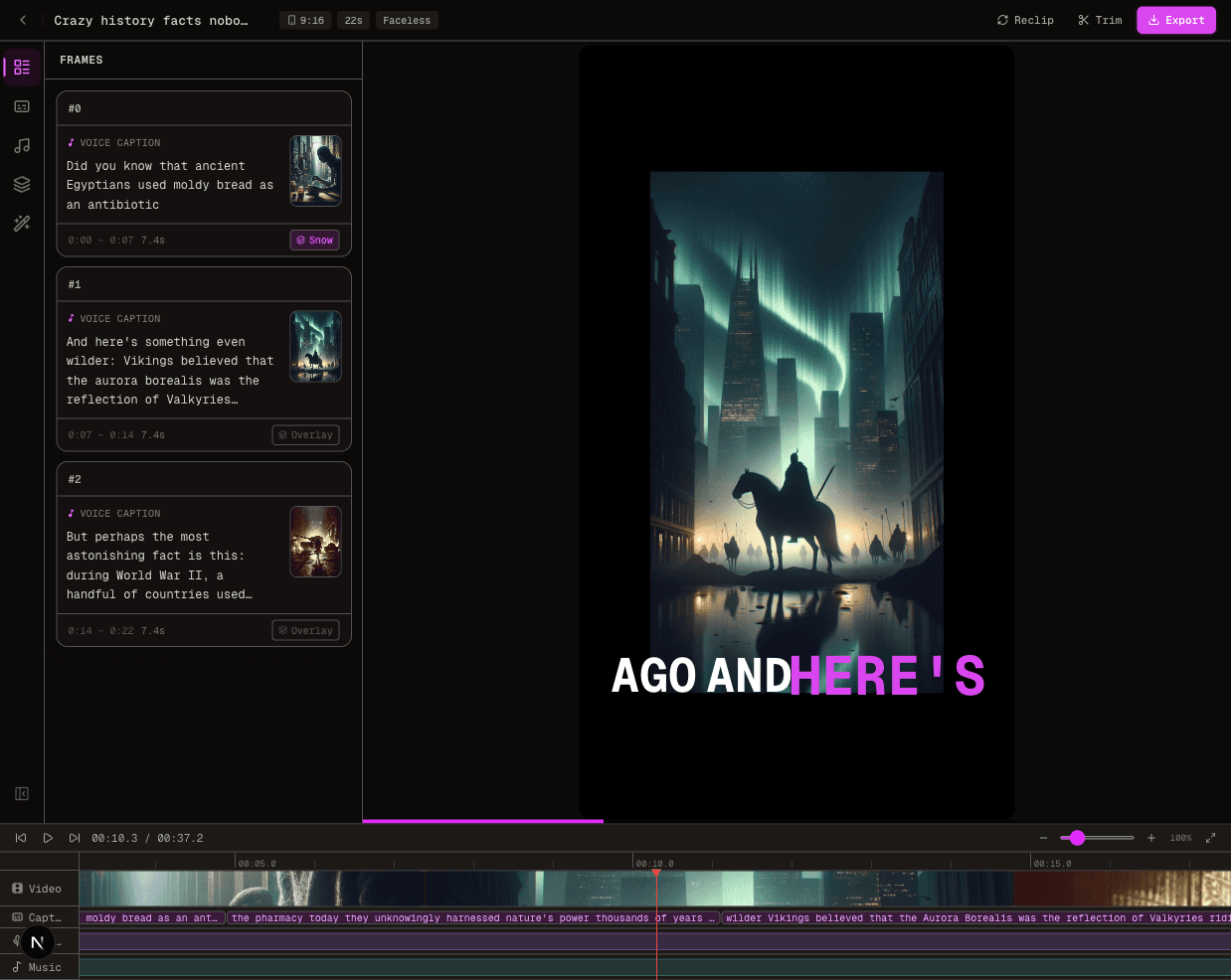
Use the Faceless studio to choose a style and build around your topic or script. Explore image and video creation for supporting visuals, then review narration, scenes and captions. Short-form and long-form projects have different requirements; check the duration and export options of your selected workflow.
Create your faceless video in FluxNote.
This is a FluxNote-published recommendation for creators who want an integrated workflow, not an independent ranking or a claim that we benchmarked every competing tool. Access and generation allowances depend on your plan.
Compare FluxNote with a separate production stack
Choose the approach that leaves you with the least unfinished work on a representative project. A specialist stack can be useful when you need a particular control; an integrated studio is a starting point when you want the creative stages together.
| Production need | Start in FluxNote | When to evaluate a specialist tool |
|---|---|---|
| Story and format | Build around a topic or script in a faceless workflow | Your research or script collaboration needs extend beyond the studio |
| Visuals | Explore image and video generation | You require a specific capture, design or animation technique |
| Narration | Review the available voices and generated narration | Your language, pronunciation or audio-editing requirements need different controls |
| Captions and finishing | Review captions and edit the project | You require advanced finishing controls unavailable in your chosen workflow |
| Publishing decisions | Prepare a reviewed video for your channel | Use your channel analytics to understand viewer response |
Check FluxNote's current plans against your expected volume and revision needs. Compare usable output rather than treating credits from different services as equivalent. We do not claim that one subscription replaces every possible specialist tool.
Create your first faceless YouTube video in FluxNote
- 1Choose one original topic you can explain accurately. Write down what the viewer should learn.
- 2Select a faceless style that suits the topic rather than picking a format only because it is popular.
- 3Add your idea or prepared script and review the selected workflow's settings.
- 4Inspect each scene against the narration. Replace irrelevant visuals and correct factual errors.
- 5Check names, pronunciation, captions and pacing in the editor.
- 6Preview the export before publishing, including its framing on the device your audience uses.
Example brief: ‘Explain three ways to organize a small desk. Show one practical change per scene, explain why it helps, and end with a simple action the viewer can try.’ This is an original example prompt, not a claim about measured channel performance.
Choose tools for Shorts and longer videos separately
For a Short, test whether the opening communicates the idea clearly, captions remain readable and the visuals fit the frame. Cut repetitive lines before adding more effects.
For a longer video, prepare a section outline, transitions and a consistent visual direction. Review the full narration for repetition and check that later scenes still support the explanation. Confirm supported duration before choosing a workflow for a long project.
An original explanation, demonstration or story is a better brief than copying another channel's script. Keep references for factual claims and permissions for supplied assets. Software cannot guarantee audience growth or monetization eligibility.
Test one project before buying more subscriptions
Use one representative script to evaluate the tools you are considering. Record the scene replacements, pronunciation corrections, caption edits and export work that remain after generation. Include revision costs in your budget.
| Check before committing | What a useful test tells you |
|---|---|
| Scene relevance | Whether the visuals explain your actual script |
| Voice and language | Whether names and important terms sound right |
| Editing | Whether you can make the changes your channel requires |
| Export conditions | Whether framing, quality and branding meet your needs |
| Allowances | Whether expected production and revisions fit your plan |
Start with the workflow, not a promise of instant results or guaranteed income. Try your first faceless project in FluxNote and review current plan allowances before scaling production.
Create Videos With AI
From inspiration to your own creation
Put your next idea into action.
Videos, images and ads. One creative studio. Pick what you want to make—or try the walkthrough before you sign up.
Your ideas. Your videos. No camera required.
Turn your next story into a faceless video. Explore the workflow, then create your own in FluxNote.
- 01 Choose a style
- 02 Add your idea
- 03 Make it your own
Start with an account. Create at your own pace.
Loading walkthrough… Full-screen link below if needed.
Tool access and generation allowances depend on your plan.
Frequently Asked Questions
Related Resources
- GuideAI Video Generator No Watermark Free (5 Tools Tested 2026)
- GuideCrayo AI Review: Features and When to Choose FluxNote
- ToolText to Video AI: Turn Text Into Videos [Fast]
- ToolAI Faceless Video Generator Guide | FluxNote
- Best-ofBest Faceless YouTube Tools for 2026
- GuideTop 5 AI Tools for Faceless YouTube Channels (2026 Tested)
- GuideBest AI Tools for Faceless YouTube [2026]