Guide
Automatic SubtitlesVideo CaptionsSocial Media VideoFree Video EditorFree Automatic Subtitle Generator: No-Watermark Options
Need subtitles on a video you already recorded? Compare an editor that exports visible captions with YouTube's optional caption track. If you need to create the video as well, explore FluxNote separately. Free account access does not mean unlimited caption editing or exports.
By the FluxNote Editorial Team · Last updated: September 13, 2026

Which free subtitle option fits your video?
Choose the output you need before choosing the tool.
Microsoft Clipchamp's free plan includes AI subtitles and watermark-free video exports up to 1080p when using eligible free features and assets. YouTube automatic captions are useful for videos on YouTube, but viewers toggle a caption track rather than receiving text permanently embedded in the video file.
FluxNote is relevant when you also want to generate a video with narration and captions.
That is a different task from finding an unrestricted free uploader for existing footage.
This is a documentation-based guide, not a timed accuracy benchmark.
How do the no-watermark workflows compare?
The right comparison is the output and eligibility, not just whether a website has a free signup button.
| Option | Suitable task | Caption output | Check first |
|---|---|---|---|
| Clipchamp | Caption footage you already have | Text included in an exported video | Use eligible free assets and features; free export up to 1080p |
| YouTube Studio | Caption a video hosted on YouTube | Optional caption track in the player | Supported language, processing and proofreading |
| FluxNote | Generate a narrated video and explore caption editing | Captions within a creation workflow | Free allowance and editing access; not unlimited subtitle uploads |
Sources: Microsoft's plan comparison, YouTube's caption documentation and FluxNote plan details. We publish this guide, so the comparison is first-party. There is no universal winner for every video or account.
What is the difference between an SRT file and burned-in captions?
An SRT file stores subtitle text with timing information. It does not place visible text inside the video pixels.
A player that supports captions can display that file as an optional layer, and viewers may be able to switch it off. Burned-in captions become part of the exported picture, so they remain visible when the clip is uploaded elsewhere.
Choose a subtitle track when accessibility and viewer control are the priority. Choose a captioned video export when the design must appear in the clip itself.
Keep an editable text copy so corrections do not require rebuilding your transcript from scratch.
How should you add and review automatic captions?
Start with a short representative clip, confirm its language and run the selected tool's automatic-caption function. Read the generated transcript against the audio before styling it.
Correct names, technical terms, numbers and punctuation, then inspect where sentences split between caption blocks. Preview on a phone-sized screen to catch small text and awkward line breaks.
Export a short sample before processing a long recording. Check that the actual file has the intended caption treatment and no unexpected paid asset restriction.
Processing time depends on the tool and media; this guide does not promise a fixed three-minute completion time.
How accurate are automatically generated subtitles?
Accuracy varies with the recording and language. Overlapping speakers, music, unfamiliar terminology and unclear pronunciation can create mistakes even when the transcript looks plausible at a glance.
YouTube's official guidance explicitly recommends reviewing automatic captions. A useful test is to choose a clip similar to your normal work and record the edits needed before publication.
Include proper names and meaningful numbers in the review, because a small transcription error can change the message. We do not claim a measured accuracy percentage: no reproducible cross-tool benchmark was performed for this revision.
When does the FluxNote workflow make sense?
Choose this route when your project begins with an idea or script, not only an existing video that needs subtitles. Create a free account, pick a suitable video format, add the topic or script and review the generated scenes, narration and captions.
Check current plan access before relying on advanced editing, premium models or export settings. A free account is a limited evaluation, not unlimited caption production.
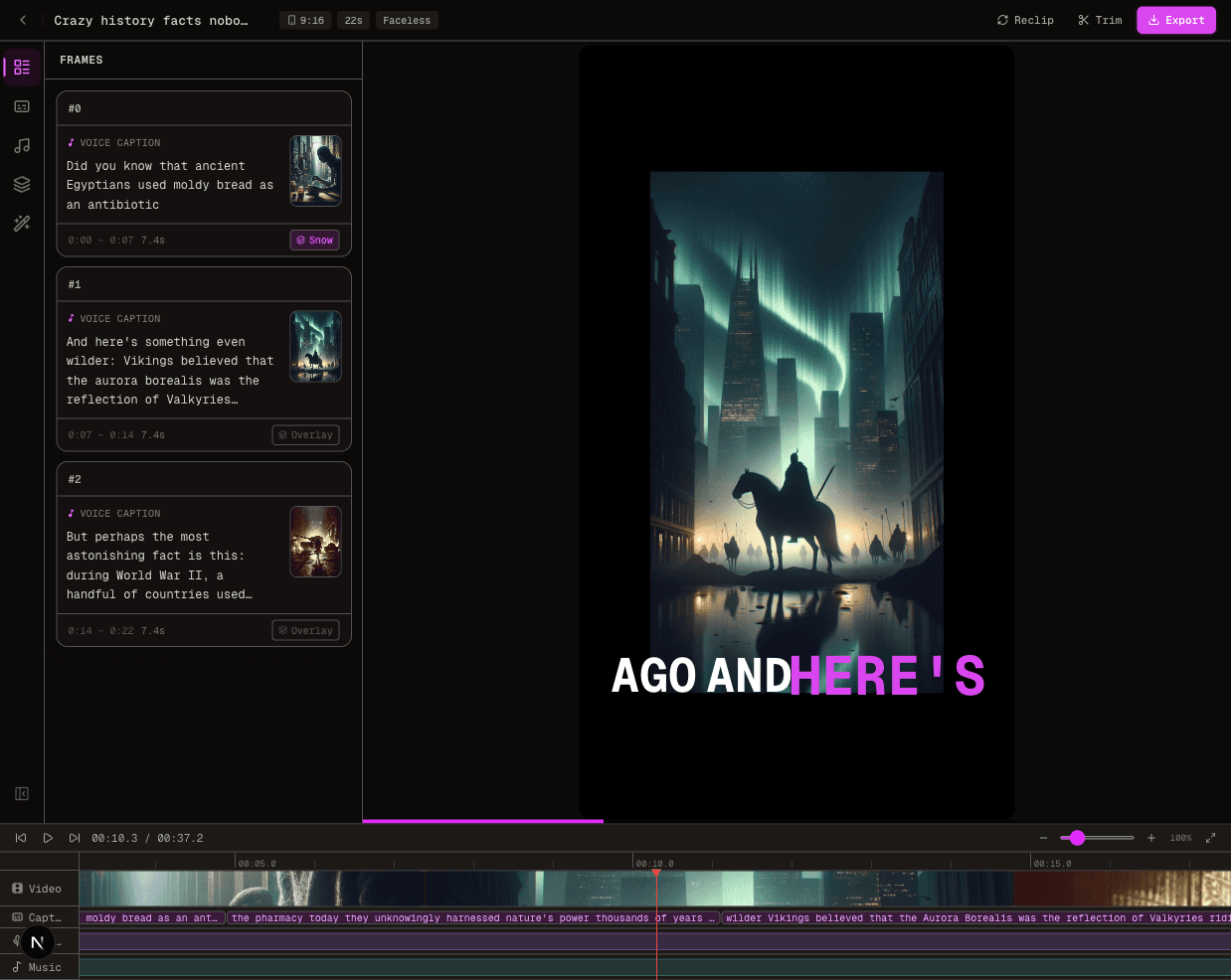
The actual editor screenshot below shows the interface, not a promise that every displayed feature is included on every plan. Explore the AI subtitle workflow or video generator for the relevant next step.
What makes captions readable on social video?
Keep enough contrast between text and moving backgrounds. Use short lines that can be read comfortably at the pace of speech, and avoid covering faces, products or important on-screen actions.
Reserve space for each platform's buttons and description overlays. Highlight words only when that emphasis helps the viewer follow the message; constant animation can distract from the speaker.
Watch the exported video at normal playback speed with sound both on and off. A transcript that is correct in an editing panel may still appear too late, disappear too early or become difficult to read after cropping.
What should you check before exporting a full project?
Confirm the account tier, watermark policy, resolution and any premium elements in the project before committing time to a long edit. Keep the source recording and corrected transcript so you can revise or move tools later.
Check whether you need a separate subtitle file, a burned-in video or both, and verify that the chosen workflow actually produces it. For client material, confirm upload permission and data-handling requirements.
The earlier version of this page mixed unrelated pricing copy with unsupported testing and allowance claims. This revision removes those claims and focuses on choosing and verifying the right caption task.
Pro Tips
- Proofread names and numbers against the audio before styling.
- Export a short sample before committing to a long project.
- Keep subtitle files and original footage for future corrections.
- Compare the actual downloadable output, not only the preview.
Create Videos With AI
From inspiration to your own creation
Put your next idea into action.
Videos, images and ads. One creative studio. Pick what you want to make—or try the walkthrough before you sign up.
Make every word easier to follow.
See how to add and customize video captions in FluxNote. Review the words and choose a style that fits your footage.
- 01 Add your video
- 02 Customize captions
- 03 Review your result
Start with an account. Create at your own pace.
Loading walkthrough… Full-screen link below if needed.
Tool access and generation allowances depend on your plan.
Frequently Asked Questions
Related Resources
- GuideFootball Edits Without Copyright Strikes (2026)
- GuideGet TikTok Views: [2026] [Free] AI Guide
- ToolAI Subtitle Generator: 25+ Styles [Free]
- ToolText to Video AI: Turn Text Into Videos [Fast]
- GuideInVideo AI Pricing: Plans, Credits & True Cost
- ToolFree AI Video Generator [No Watermark]
- GuideFree Subtitle Generator No Watermark (2026 Tested Tools)