Guide
Invideo ai pricingInvideo pricing 2026Invideo ai costInvideo creditsInVideo AI Pricing 2026: Plans, Credits & True Cost
InVideo's public annual-billing view currently lists Starter, Plus and Max. Compare the per-seat commitment, credits and editing workflow with FluxNote before choosing a plan. Your account or checkout may show different options, so verify the selected interval and allocation.
By the FluxNote Editorial Team · Last updated: September 13, 2026
From inspiration to your own creation
Put your next idea into action.
Videos, images and ads. One creative studio. Pick what you want to make—or try the walkthrough before you sign up.
Give your product a new way to stand out.
Bring your product assets and script into Ad Studio. Explore different hooks and creative directions for your next video ad.
- 01 Add your product
- 02 Choose your hook
- 03 Build your creative
Start with an account. Create at your own pace.
Loading walkthrough… Full-screen link below if needed.
Tool access and generation allowances depend on your plan.
InVideo AI Pricing: The Short Answer
InVideo's public pricing page checked on September 13, 2026 shows the following annual-billing view. These are per-seat monthly equivalents billed annually, not month-to-month prices. Check the selected product, seats, currency and final checkout amount before paying.
| Plan | Monthly equivalent, billed annually | Credits per seat per month |
|---|---|---|
| Starter | $20 | 400 |
| Plus | $50 | 2,000 |
| Max, starting allocation | $100 | 5,000 |
Source: InVideo's current pricing. Higher Max credit allocations and account-specific configurations can change the bill.
Plan names and offers change. Do not combine a historical quota with a current subscription price, or assume that an agent named Pro or Ultra is itself the plan you are purchasing. If your account shows a different lineup, use the terms attached to that account.
InVideo AI vs FluxNote: Compare Before You Subscribe
FluxNote publishes this guide, so this is a first-party comparison, not an independent review. Both services offer AI creation and editing; the useful question is which workflow suits your project.
| What to compare | InVideo AI | FluxNote |
|---|---|---|
| Free evaluation | Limited credits; no card required | One AI-produced video per month at 720p, 100 Image Studio credits and UGC previews; no card required |
| Paid billing | Starter, Plus and Max in the reviewed annual-billing view | Rise, Pro, Max and Ultra; choose monthly, quarterly where offered, or annual billing on the pricing page |
| Allowance structure | Model-dependent generation credits | Finished-video allowance plus a separate shared generation-credit pool on paid plans |
| Editing | Timeline editor included in the listed paid plans | Scene, caption, voiceover and timeline editing; access depends on the plan |
| What to test | Your chosen agent, model and collaboration workflow | Your video format, Image Studio, captions and editing workflow |
Sources: InVideo pricing, InVideo free access, and FluxNote pricing and plan limits.
Credits are not equivalent between products.
A generated clip is also not necessarily a complete narrated video. Compare a similar deliverable, duration, resolution and number of revisions. Free access is for evaluation; do not assume premium models or paid UGC generation are included.
Use the same short script in both products. Review the output and the work still needed before choosing a subscription.
How Many Videos Do InVideo Credits Buy?
There is no universal credits-to-finished-videos conversion.
InVideo’s current credits explanation says usage depends on the model and generation settings.
Video-model charges can depend on seconds, resolution and audio; exporting is not itself a generation charge.
A fixed credits-per-minute table would hide differences between models and settings. Agent or model labels should not be confused with subscription names.
Budget a project, not just one generation
List the scenes you need, choose a duration for each and inspect the estimate in the tool before generating. Keep a small test project and record actual usage rather than applying another website’s fixed rate to your account.
| Budget item | What to record |
|---|---|
| First draft | Settings, duration and displayed generation cost |
| Revisions | Additional attempts and any new media generated |
| Finishing | Caption, audio and timeline work still needed |
| Final export | Resolution, branding and usage permissions |
Your useful comparison is the cost and effort of a result you would actually use. Two clips with different quality settings are not a like-for-like price comparison.
Does InVideo AI Have a Free Plan?
Yes. InVideo’s free-plan help article describes limited credits without a card, with the quota resetting weekly on Monday at 00:00 UTC.
It includes trying image generation and image-to-video workflows. The exact available allowance and generation settings should be checked inside your account.
For a practical trial, pick one small project instead of spending the allowance on unrelated prompts. Keep the same script and visual brief when comparing tools. Check the export and licensing conditions before using the result for a client or campaign.
FluxNote’s Free plan offers one AI-produced video per month at 720p and 100 credits to try Image Studio, with preview access to UGC Studio. Paid UGC generation and premium-model access are not part of that promise. Choose a test that fits the free allowance.
Which Workflow Should You Choose?
Try InVideo first if
Its agent workflow, listed models or multiplayer editing are central to the way your team wants to work. Confirm the required feature on the exact plan before buying.
Try FluxNote first if
You want to explore a faceless-video format or move between video, image and product-creative workflows in one workspace. Evaluate the actual result rather than assuming one tool will be better for every prompt.
For recurring social content
Draft a representative script and check how much scene selection, narration correction and caption editing remain after generation. A tool that produces a promising first frame may still need substantial finishing work.
For a team
Have the person who will edit and publish test the workflow, not only the person approving the subscription. Confirm access, permissions and recurring workload before purchasing seats.
Do not switch solely because a headline monthly equivalent looks lower. Compare the billing commitment, supported workflow and deliverable together.
Try the FluxNote Workflow With Your Own Script
Start with a small, specific project so the evaluation answers a real question.
- 1Create a free FluxNote account and choose a video format relevant to your channel or business.
- 2Add your topic or script. For example, explain one practical tip in a short narrated video rather than requesting an entire campaign.
- 3Review the generated scenes, voiceover and captions. Correct factual details and wording before publishing anything.
- 4Check editing access on your plan, then explore scene timing and caption adjustments where available. Evaluate whether the workflow fits your project.
- 5Review current plan allowances only when you need more volume, premium models or other paid features.
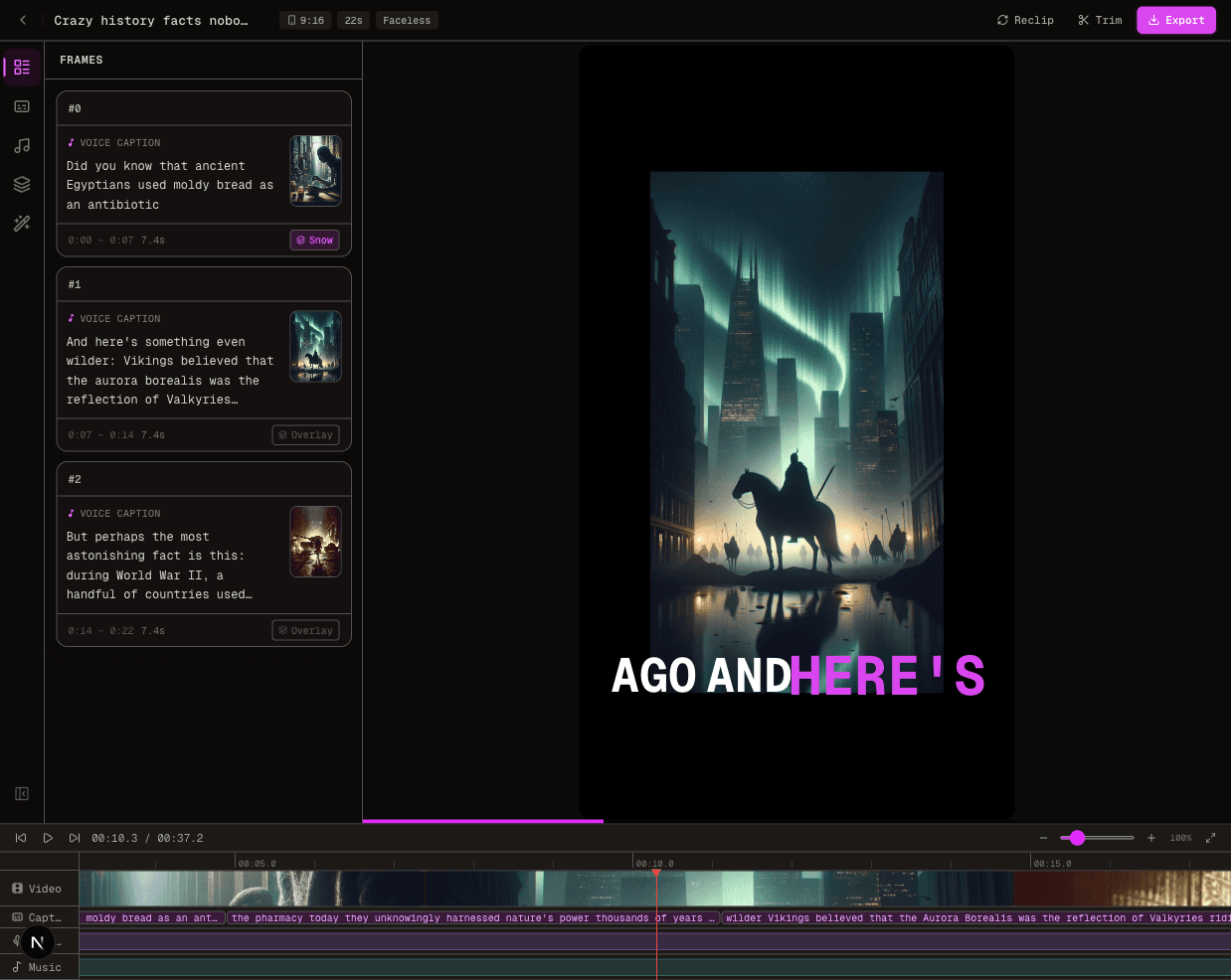
The screenshot below shows an actual FluxNote editing interface, not a promise that every prompt will produce the same output. For more detail, explore the AI video generator and caption workflow.
Credit Rollover, Top-Ups and Billing Checks
InVideo’s billing help says included credits reset on the monthly renewal date and do not carry forward.
It describes purchased extra credits as valid for 12 months and subject to the current subscription’s expiry.
Confirm these conditions before buying a top-up.
Before paying, review the checkout rather than only the pricing card. Note the renewal date, billing interval, seats and final amount. If testing a paid model, inspect its current cost estimate before starting a batch. A larger credit balance does not guarantee a specific number of finished projects.
Sources and What We Updated
Reviewed September 13, 2026 against InVideo pricing, its plans and credits help, the free-plan documentation and FluxNote’s public pricing.
This revision replaces the older plan lineup and fixed generation-rate table, makes annual billing explicit, and adds a side-by-side workflow comparison. It is not a hands-on benchmark of every model. Prices, promotions and account-specific terms can change; the provider’s checkout and in-app estimate take precedence.
Create Videos With AI
From inspiration to your own creation
Put your next idea into action.
Videos, images and ads. One creative studio. Pick what you want to make—or try the walkthrough before you sign up.
Give your product a new way to stand out.
Bring your product assets and script into Ad Studio. Explore different hooks and creative directions for your next video ad.
- 01 Add your product
- 02 Choose your hook
- 03 Build your creative
Start with an account. Create at your own pace.
Loading walkthrough… Full-screen link below if needed.
Tool access and generation allowances depend on your plan.
Frequently Asked Questions
Related Resources
- GuideAI Video Generator Pricing Answered
- GuideCapCut Pricing 2026: Pro Price, Monthly & Yearly Cost
- GuidePictory Pricing 2026: Starter $19/mo, 3-Video Cap Caught
- GuideOpus Clip Pricing 2026: Free, Starter $15, Pro $29
- GuideFluxNote vs. InVideo AI: 2026 Creator Showdown
- ToolText to Video AI: Turn Text Into Videos [Fast]