Best Of
Best AI Video Generator Free Trial Options in 2026
A free plan, a one-time credit trial and a free editor solve different problems. Compare the type of access you get, test one real project and inspect the export before subscribing. This is a first-party, documentation-based comparison—not a measured ranking of output quality.
Last updated: September 13, 2026

Video creation · Narration · Captions
Before you subscribe, try your own video idea.
Try FluxNote with a topic or script. Evaluate the generated video and check editing access before choosing a paid plan.
How We Selected These Tools
- Distinguishes recurring free access from one-time trial credits.
- Checks generation separately from editing existing footage.
- Uses provider documentation; no invented hands-on scores.
- Discloses that FluxNote publishes this comparison.
FluxNoteOur platform
A starting point for evaluating narrated video creation and Image Studio within a free account. Check the current generation allowance and editing eligibility before planning a project. Suitable when you want to explore several creative workflows in one workspace, rather than only test a standalone cinematic clip.
Runway
Runway's pricing page lists 125 one-time free credits and selected models for evaluation. These are not a monthly replenishing production allowance. Model availability and costs determine what can be generated; check the in-app estimate instead of translating credits into a fixed video duration.
InVideo AI
InVideo documents limited free access for trying its creation workflow. Inspect the quota and export conditions in your account, rather than assuming old ten-video claims still apply. Compare the amount of editing needed to turn a generated draft into the deliverable you actually want.
Clipchamp
Clipchamp is included here for people whose real need is editing their existing footage, not generating an entire video from a prompt. Its free plan includes AI subtitles and watermark-free exports up to 1080p using eligible assets and features. Do not confuse free editing with unlimited generative video.
Which kind of free trial do you actually need?
Start with the work, not the plan label. A creator needing a narrated explainer wants to evaluate scenes, voice and captions together.
A filmmaker testing a single shot needs control over a short generated clip. Someone with a finished recording may only need editing and subtitles.
These are different purchasing decisions, so the numbered options above are an editorial shortlist rather than a performance leaderboard. FluxNote publishes this comparison.
Check the linked provider documentation and test your own material before deciding which workflow suits you; a polished example from another project does not establish your expected result.
How do the free access models compare?
Use this table to separate the type of access from its marketing name.
| Service | What you are evaluating | Important limit |
|---|---|---|
| FluxNote | Narrated creation and image workflows | Free generation allowance and plan-based editing access |
| Runway | Generative visual models | Trial credits are one-time, not monthly |
| InVideo AI | AI-assisted creation workflow | Read the current account quota and export conditions |
| Clipchamp | Editing and captioning your footage | Generative video is not the same as free editing |
Sources checked September 13, 2026: Runway pricing, InVideo free access, Clipchamp pricing and FluxNote pricing.
Avoid combining an old allowance with today's subscription names.
Provider terms can change, so verify the relevant limit before starting a large project.
How should you test a video generator before paying?
Write a brief you can use across tools. For example, explain one practical tip in a short video with three scenes, a clear spoken script and readable captions.
Keep the intended duration, language and aspect ratio consistent. Decide what an acceptable result looks like before generating.
Review whether the visuals support the script, whether narration pronounces important words correctly and whether captions remain readable. Record the edits needed after the first draft.
This suggested evaluation method is not a claim that we ran a controlled benchmark; its purpose is to help you make a decision based on your own workload.
What does a credit allowance tell you?
Credits tell you how a service meters usage, not how many finished projects you will obtain. Costs may vary by model, clip duration and settings, and a revision can require another generation.
A five-second shot and a narrated explainer are not interchangeable outputs. Keep an allowance log for your test: starting balance, settings, attempts, accepted scenes and remaining balance.
This helps you budget more realistically than dividing a subscription by the number of promotional examples shown on a website. Never compare one provider's credit directly with another's without first matching the actual deliverable.
What should you inspect in the exported file?
Download a test when the selected account permits it, then watch the actual file rather than only the editor preview. Check resolution, crop, audio balance, captions and any branding.
Ensure the media and music are permitted for your intended use. A free signup button does not establish commercial clearance or access to every stock asset.
If a client needs a particular resolution or format, confirm that requirement before spending your entire trial on generation. Preserve the project and source script so you can revise facts or replace a scene without starting the creative brief over again.
How can you try the FluxNote workflow?
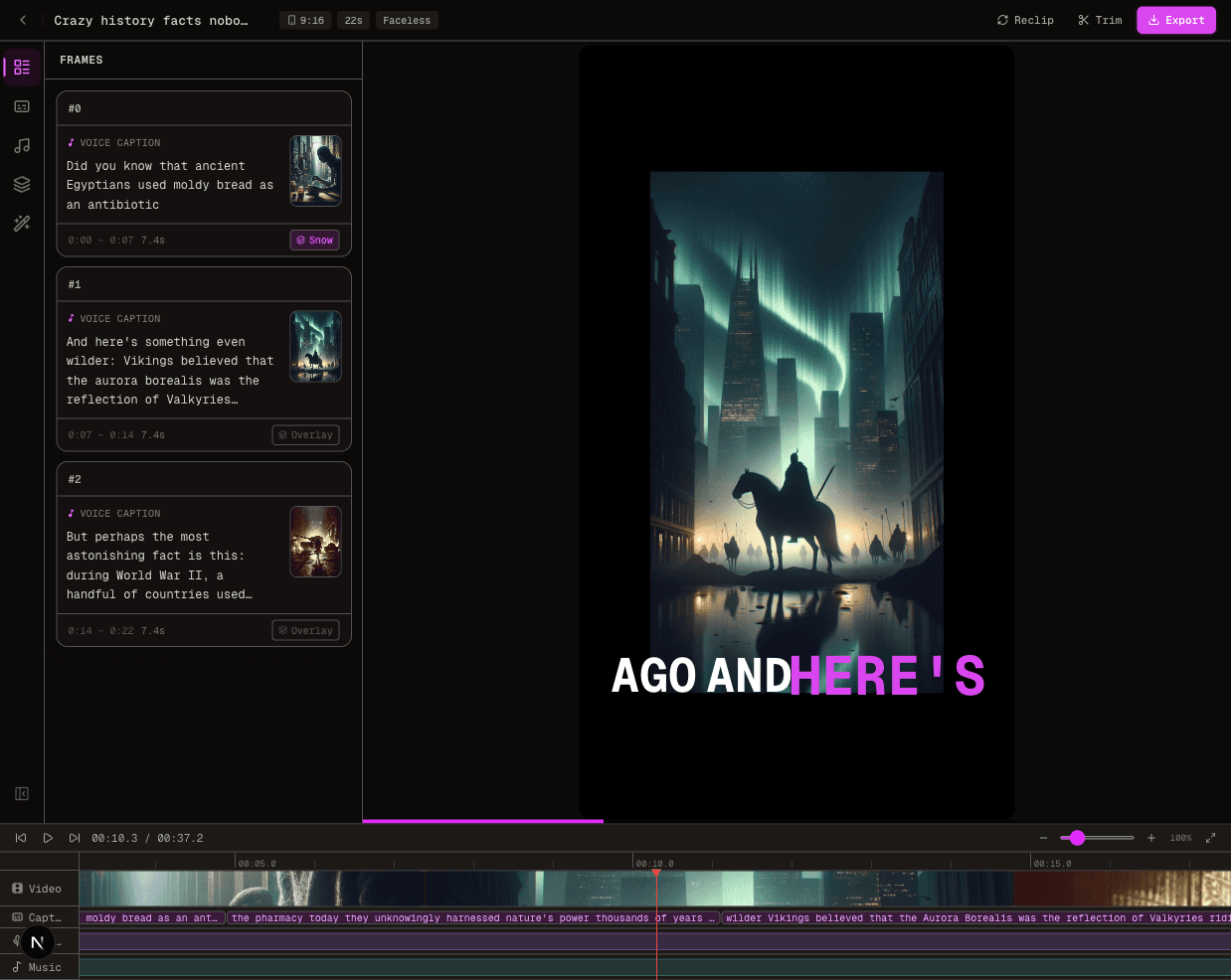
Create a free account, choose a suitable video format and start with one short topic or script. Review the scenes, narration and captions after generation.
Check current plan eligibility before relying on advanced editing or premium models. The screenshot below shows an actual editor interface, not a guarantee that every visible feature is included in free access.
For a focused next step, explore the AI video generator. If your project starts with a still visual, use the image prompting walkthrough before evaluating animation.
Keep your first test small enough to answer one clear question about fit.
When is an upgrade worth considering?
Upgrade when a workflow already produces useful results and a specific limit blocks your next task. That could be production volume, a required model, collaboration or an editing feature.
Estimate revisions and finishing time, not only successful first generations. Read the billing interval and renewal terms, especially when a monthly equivalent is paid annually.
Do not switch services solely because a headline price looks lower. For a more focused decision, read the InVideo comparison or the subtitle options guide.
Choosing a narrower tool can be sensible when your job is only one part of the production process.
Video creation · Narration · Captions
Before you subscribe, try your own video idea.
Try FluxNote with a topic or script. Evaluate the generated video and check editing access before choosing a paid plan.